on kde and some other stuff
- kde respects bugs. bugs in kde3 have their equivalent in kde4. rule of thumb in developing kde is 'we do not fix bugs. ever.' the worst part is that important bugs in kde3 were not fixed in several years. it's been two years now and kde4 doesn't even provide the features kde3 did (oh yes, instead it is providing hundreds of new features, which all make it a very productive environment - especially if you know how to kill kdm every 2 hours)
- here's the routine when working in kde4:
1. type your username and password
2. change the last desktop environment from gnome to kde
3. now make your mouse search for that ENTER button which doesn't exist
4. take your right hand (if you're a right-handed person, otherwise take your left) off the mouse and press Enter
5. you are now logged in
6. open the web browser and navigate to a web page
7. (this happens only 50% of the time) open a terminal and kill your web browser
8. restart kdm (and goto 1)
- i wonder why didn't anybody bothered to make a 'satanic' edition of kubuntu? (yeah, i know, but don't smile, it's sad but true)
- for some strange reasons sound will cease to work at some point
- the killer app (that's amarok) is no longer - it is a fiasco, a shame, an app which opposes to any possible usability rules from every aspect, it is full of bugs, it is non-intuitive, it is stripped from every single useful feature, and it does this successfully for two years now
- (instead let's take a look at rhythmbox which, in order to play a song will require you to: 1. type alt+s; 2. type the name of some song; 3. wait for 5 seconds (for over 10,000 songs collections); 4. at this point the song is listed and (obviously) you'll want to play it, but surprise! enter does not work; 5. so move your dirty lil' fingers to the mouse and double-click the song; 6. What a funny experience! there is actually a song playing 7. but now you want to change the song, aye? 8. remember: press alt+s again, ctrl+a to delete the search filter; 9. now where is my song? 10. press ctrl+j and there you go!)
- the same thing in amarok: oh wait, you can't do it from the keyboard (now that's a standard application, and they had two years to do a simple search 'n play thing)
- kde4: we want equalizer! we want equalizer! kde4 is all about innovation, but they say that phonon (what's that?) doesn't support equalizer! oh crap... and i thought linux was ready for the desktop... ever since... 2002?
we are the creators of ubu-vista.com, ubu-vista.org, ubu-vista.net and maybe also ubu-vista.etcetera (just hit refresh on that domains until we register them)
we had the idea of bringing the ubu-vista operating system to you, and it features:
- full desktop environments like aero-gnome (parachuters included)
- several addictive games which don't crash (only 20 openend-bugs!)
- video editeur (to start it and see the crashing output in the console)
- audio editeur (it kind of works but... it crashes when it comes to proprietary formats and strangely it doesn't have support for Ogg Vorbis or flac)
- shell commander: that thing which can be replaced with synaptic if you know what you're doing
- the 'olive', 'goat's shit' and 'you can't stand me' themes (upcoming 'i shit my pants' on its way)
Each and every new release of firefox is faster, less memory-hungry and more powerful! (actually this is true and non-ironical, except for the faster and memory parts)
rules of thumb:
- do not use flash (unless you have a script to save session, kill fx and start a new session every... (well, this depends on the fx version, if you have the latest updated 2.x you'll have the chance to work for 3 hours uninterrupted, for the 3.5 i warmly recommend to just not use a web browser (i'm sure in 2010 we could use dillo, or, still better, lynx)))... was that 45 seconds?
back to the point:
- i like how kde 4 improved in the last two years, but for some strange reason those windows are always 200x200 pixels when a single widget inside them is bigger
December 29, 2009


August 27, 2009
Sometimes It Won't Work (II)
Linux user for a couple of years. Only Linux and I love it. Still, some things are wrong, they are wrong, and unfortunately, as I see it, they will always be wrong (yes I'm paid by Microsoft to say this; and yes I get the big bucks from them; and yes that's true, and unfortunately it seems like it's true for a long time now :(
subtitles green red blue and pink
(i'm waiting for when they're making them black on grey background)
change the volume, subtitles don't work
encrypted dvds usually work
non-encrypted dvds don't :)
do not request a bug to be fixed, the software comes with no warranty
each and every bug (from the tens of tens you discovered) will be fixed in the next version
new version -> happy -> sad (no fixes)
linux programmers are professionals = each and every one are biologists, botanists, geographists, working in their spare time (i wonder where the "computer science" guys are working at - either in their spare or working time)
do not, under any circumstances plan to uncompress a big archive and use another application in the same time, not even on high-end pcs
we have a completely modern os, but don't do anything else while deleting or copying a 4 GB single-file
release early - release often = great practice, but why the hell tag applications as 'stable' when they're not even in alpha working state?!
new distro available, here are the brand new amazing features:
- full desktop environments like airo-gnome (parachuters included)
- 3 games which don't crash (only 20 openend-bugs!)
- free office suite - be thankful we provide 30 DEBs to install it
- video editor (to start it and see the crashing output in the console)
- audio editor (it kind of works but... it crashes when it comes to proprietary formats and strangely it doesn't have support for Ogg vorbis or flac)
- hdd editor (you can erase your entire drive if you like, if you don't we'll do it for you for free)
- shell commander: that thingy where you have to type those strange thingies, just make sure not to press Shift for more than 3 seconds
- the 'olive', 'goat's shit' and 'you can't stand me' themes (upcoming 'i shit my pants' on its way)
- we always loved to innovative, but how: mess up a boot manager, and do not ever provide help for fixing and getting to know it (something tells me 1000 posts on a specific forum will be posted in October)
Oh and by the way, how I love this "if you don't like it, do it yourself" thing. So I was submitting a bug for what was (and is) supposed to be a "stable" distro and the answer was "does it happen in the new version of..." . It's great to see such wonderful tools and so much work going to nothing just because we get to "freeze" things up. I think freeze it's a nice word for what is going on. Make every interface possible as amateurish as possible, respect the DFSG as good as possible, even if that means "ship a 'stable' system, even if that means to ship a still crappy system'". Each and every time I open Amarok 1.4 I enjoy to see how Wikipedia doesn't work in a so-called 'stable' distro. Especially since 2.x is a state-of-art piece of software. Vision for the future, but everything is broken. And it's been 2 years already. Great work!
Stay tuned, for parts 3, 4, 5 and 6 will come soon :)
P.S. Do you still think we can fix bug number 1? and P.S.2 that was a lame post, but I doubt it wasn't true. Some things can be ignored, and there is a lot of great, awesome work going on. Take the entire KDE desktop. Wonderful. Open an application. Why do you have to resize everything? Why do you have to open a konsole and kill a plasma widget? For fuck's sake, a simple action like open a new tab, copy a file over a file and uncompressing in the same time an archive doesn't work sometimes. Drag and drop a file and resizing a window doesn't work sometimes. Sometimes you won't even get sound out of your player, even though the so called drivers should work. Sometimes just searching in a listbox will freeze the system. Sometimes previews don't work. Sometimes just opening a save file as box won't even show the files of the same filetype. We have the powerful file utility but there are still problems when trying to compile a .c file source if it doesn't have the .c extension. We have two good ways (and logical) of copying, by selecting and by using a clipboard. Do they work well in some desktop environment? Neah, they don't. We have so many libraries doing all the work. And 10 applications which use those libraries. If there is one, one single bug hard to fix in any of them, it won't get fixed. There still is a bug in KDE3 which didn't get fixed because of "Qt3 issues". (multicolumn view mode, navigating by arrows jumped files by a rule). So, we get open source software which can be modified, but that bug never got fixed, although it could've been. Is this an OS? Beause if that's an OS I'm curious how can anybody be productive working with it.
subtitles green red blue and pink
(i'm waiting for when they're making them black on grey background)
change the volume, subtitles don't work
encrypted dvds usually work
non-encrypted dvds don't :)
do not request a bug to be fixed, the software comes with no warranty
each and every bug (from the tens of tens you discovered) will be fixed in the next version
new version -> happy -> sad (no fixes)
linux programmers are professionals = each and every one are biologists, botanists, geographists, working in their spare time (i wonder where the "computer science" guys are working at - either in their spare or working time)
do not, under any circumstances plan to uncompress a big archive and use another application in the same time, not even on high-end pcs
we have a completely modern os, but don't do anything else while deleting or copying a 4 GB single-file
release early - release often = great practice, but why the hell tag applications as 'stable' when they're not even in alpha working state?!
new distro available, here are the brand new amazing features:
- full desktop environments like airo-gnome (parachuters included)
- 3 games which don't crash (only 20 openend-bugs!)
- free office suite - be thankful we provide 30 DEBs to install it
- video editor (to start it and see the crashing output in the console)
- audio editor (it kind of works but... it crashes when it comes to proprietary formats and strangely it doesn't have support for Ogg vorbis or flac)
- hdd editor (you can erase your entire drive if you like, if you don't we'll do it for you for free)
- shell commander: that thingy where you have to type those strange thingies, just make sure not to press Shift for more than 3 seconds
- the 'olive', 'goat's shit' and 'you can't stand me' themes (upcoming 'i shit my pants' on its way)
- we always loved to innovative, but how: mess up a boot manager, and do not ever provide help for fixing and getting to know it (something tells me 1000 posts on a specific forum will be posted in October)
Oh and by the way, how I love this "if you don't like it, do it yourself" thing. So I was submitting a bug for what was (and is) supposed to be a "stable" distro and the answer was "does it happen in the new version of..." . It's great to see such wonderful tools and so much work going to nothing just because we get to "freeze" things up. I think freeze it's a nice word for what is going on. Make every interface possible as amateurish as possible, respect the DFSG as good as possible, even if that means "ship a 'stable' system, even if that means to ship a still crappy system'". Each and every time I open Amarok 1.4 I enjoy to see how Wikipedia doesn't work in a so-called 'stable' distro. Especially since 2.x is a state-of-art piece of software. Vision for the future, but everything is broken. And it's been 2 years already. Great work!
Stay tuned, for parts 3, 4, 5 and 6 will come soon :)
P.S. Do you still think we can fix bug number 1? and P.S.2 that was a lame post, but I doubt it wasn't true. Some things can be ignored, and there is a lot of great, awesome work going on. Take the entire KDE desktop. Wonderful. Open an application. Why do you have to resize everything? Why do you have to open a konsole and kill a plasma widget? For fuck's sake, a simple action like open a new tab, copy a file over a file and uncompressing in the same time an archive doesn't work sometimes. Drag and drop a file and resizing a window doesn't work sometimes. Sometimes you won't even get sound out of your player, even though the so called drivers should work. Sometimes just searching in a listbox will freeze the system. Sometimes previews don't work. Sometimes just opening a save file as box won't even show the files of the same filetype. We have the powerful file utility but there are still problems when trying to compile a .c file source if it doesn't have the .c extension. We have two good ways (and logical) of copying, by selecting and by using a clipboard. Do they work well in some desktop environment? Neah, they don't. We have so many libraries doing all the work. And 10 applications which use those libraries. If there is one, one single bug hard to fix in any of them, it won't get fixed. There still is a bug in KDE3 which didn't get fixed because of "Qt3 issues". (multicolumn view mode, navigating by arrows jumped files by a rule). So, we get open source software which can be modified, but that bug never got fixed, although it could've been. Is this an OS? Beause if that's an OS I'm curious how can anybody be productive working with it.
April 26, 2009
How-To: Enable Last.fm Song Submission in CMus in Debian and Ubuntu
CMus is a very powerful audio player for the console with a ncurses-based interface, support for themes and highly configurable.
Although (at least in Debian) CMus does not come with Last.fm song submission support by default, there is a script available here as a patch, which you can apply to the source, compile CMus again and enable Last.fm support.
Here's what you have to do:
1. Enable sources repositories
Edit the /etc/apt/sources.list file as root with your favourite text editor (e.g. nano /etc/apt/sources.list or kdesu /etc/apt/sources.list) and make sure you have a line which starts with deb-src, as in the example below:
deb-src ftp://ftp.ro.debian.org/debian/ lenny main contrib non-free
You can replace the TLD with the one of your country (e.g. instead of ro use fi for Finland, de for Germany etc.) Next, update the packages list as root:
apt-get update
2. Get the CMus source code
Type, as normal user:
apt-get install git-core
Now issue the command:
3. Get the Last.fm patch
Go here and download the patch (direct link here). Save it inside the cmus directory. The file is called as.patch
4. Apply the patch
To apply the patch, make sure the current working directory is cmus and type:
patch < as.patch
5. Install CMus dependencies
To install the needed libraries for the compilation, type as root:
apt-get install libncurses5-dev
apt-get build-dep cmus
6. Compile and install CMus
Just type the usual:
./configure
make
make install
The last one as root.
7. Enable the Last.fm song submission script
You can either copy the following three lines inside the ~/.cmus/rc file:
set as_enable=true
set as_user=Lastfm_USER
set as_pass=Lastfm_PASS
Or run the same commands in CMUS like this:
:set as_enable=true
:set as_user=Lastfm_USER
:set as_pass=Lastfm_PASS
Just make sure to replace Lastfm_USER and Lastfm_PASS with the appropiate values.
Although (at least in Debian) CMus does not come with Last.fm song submission support by default, there is a script available here as a patch, which you can apply to the source, compile CMus again and enable Last.fm support.
Here's what you have to do:
1. Enable sources repositories
Edit the /etc/apt/sources.list file as root with your favourite text editor (e.g. nano /etc/apt/sources.list or kdesu /etc/apt/sources.list) and make sure you have a line which starts with deb-src, as in the example below:
deb-src ftp://ftp.ro.debian.org/debian/ lenny main contrib non-free
You can replace the TLD with the one of your country (e.g. instead of ro use fi for Finland, de for Germany etc.) Next, update the packages list as root:
apt-get update
2. Get the CMus source code
Type, as normal user:
apt-get install git-core
Now issue the command:
git clone git://repo.or.cz/cmus.git3. Get the Last.fm patch
Go here and download the patch (direct link here). Save it inside the cmus directory. The file is called as.patch
4. Apply the patch
To apply the patch, make sure the current working directory is cmus and type:
patch < as.patch
5. Install CMus dependencies
To install the needed libraries for the compilation, type as root:
apt-get install libncurses5-dev
apt-get build-dep cmus
6. Compile and install CMus
Just type the usual:
./configure
make
make install
The last one as root.
7. Enable the Last.fm song submission script
You can either copy the following three lines inside the ~/.cmus/rc file:
set as_enable=true
set as_user=Lastfm_USER
set as_pass=Lastfm_PASS
Or run the same commands in CMUS like this:
:set as_enable=true
:set as_user=Lastfm_USER
:set as_pass=Lastfm_PASS
Just make sure to replace Lastfm_USER and Lastfm_PASS with the appropiate values.
March 30, 2009
Review: Amarok 2.0.2 - Better Than 1.4?
Amarok always had the reputation of being the most popular and powerful audio player available on the Linux platform, and it really deserved that position. I myself am a fan of Amarok for over three years now, and there was nothing I could think of which Amarok 1.4 did not have.

For this review I used Amarok 2.0.2 (which was released to the public on March 5), included in Kubuntu 9.04 Beta (with all the upgrades to date) and I scanned several Ogg Vorbis and FLAC albums, all of them with correctly filled-in tags. I also included a compilation with several artists, which from the start messed up the entire playlist. That is, the albums from a single artist were correctly displayed, while the compilation album was spread in the entire playlist (see the screenshots below). In fact, Amarok only tries to organise tracks on the compilation depending on the artist. So if we have three artists with two songs each, they will be spread in the playlist, sorted by artist's name. Although I like how the single-artist albums are displayed in the playlist, when it comes to compilation this approach tends to mess things up and look inconsistent.

The current version of Amarok 2 does not include all the features 1.4 had, like the equalizer, statistics or queue manager, however it is a new foundation for the releases which will follow. The introduction of widgets is very useful if you ask me, and I also liked the new interface. I know there were a lot of people complaining that the central widget space is a waste and takes up too much of the area when the playlist could have been, but I think it's useful this way. The new approach gives Amarok a more organised look and a logical way of finding all the information one needs at any given time.


Another thing which I miss from Amarok 1.4 series is the ability to go directly to the next and previous tracks in the tag editor. That was a cool feature which made Amarok my audio tag editor of choice. Still, it allows for mass-tagging, which is a good thing. Of course, I'm sure these things will be implemented in the future.
Amarok correctly auto-detected the covers inside the albums' directories and displayed them in the middle panel, which proves to be very useful if used with a lyrics widget, for example.

The collection tab resembles pretty much the one in 1.4, however instead of organizing artists from the compilation albums inside that album's title, they are spread all over the place. This can get extremely annoying if you have large compilations of, say, 50 or more artists, and only a few songs from each of them. Or at least, I liked more the approach in 1.4. After an application restart Amarok did not remember the position of the left tabs, which were disabled (the Collection, Internet, Playlist and Files tabs).
The Add Media... option in the Playlist menu will only allow to add files to the playlist, so I had to use the right-click menu option Load (or Append to Playlist) from the Collection or the file manager tabs.
Some of the old features are still available, like the cover manager (which hasn't changed a bit) and the file manager. I was happy to see the old bug which froze Amarok (at least on Debian Lenny - stable) when right-clicking on a song and going to Edit Track Details in the file manager disappeared. Well, since it was rewritten it is normal to be this way.
A whole bunch of other features are now included in Amarok. Except for the widgets, the Internet tab provides access to no less than seven services, like Last.fm song submission and integration, music from Magnatune.com and Jamendo.com, OpmlDirectory (for lists of podcasts) or Shoutcast Directory (for lists of online radio stations). The script manager also allows to download other scripts from the Internet directly from within Amarok, and they are installed automatically, just like in 1.4 (and with a refined interface, cutting off the additional - and useless - steps when you had to click twice OK - once when the script was downloaded and the second time to notify you that the script was successfully installed).
Amarok now uses only QtScript, so all the scripts for 1.4 had to be rewritten. No more support for languages like Perl, Python or Bash.
Conclusion
As an Amarok 1.4 fan, I must say I also liked Amarok 2 a lot, but there are a lot of things which really need to be fixed and features to be added. What I like the best is the new approach (yeah I know there are a *lot* of people who don't like the new look), but it seems to me the way the widgets are organised and the space management is much more compact and useful now. The playlist is definitely another plus, since it looks twice as good as that simple list in Amarok 1.4 and offers a more clear view on which album belongs to which artist. It is visually more appealing. Instead, it really needs a fast way to jump to song using the keyboard.

I'm looking forward to Amarok 2.1 and I hope only for the best from the team behind this loved and popular player.
Additional screenshots


Usual instance of Amarok 2.0.2 playing

For this review I used Amarok 2.0.2 (which was released to the public on March 5), included in Kubuntu 9.04 Beta (with all the upgrades to date) and I scanned several Ogg Vorbis and FLAC albums, all of them with correctly filled-in tags. I also included a compilation with several artists, which from the start messed up the entire playlist. That is, the albums from a single artist were correctly displayed, while the compilation album was spread in the entire playlist (see the screenshots below). In fact, Amarok only tries to organise tracks on the compilation depending on the artist. So if we have three artists with two songs each, they will be spread in the playlist, sorted by artist's name. Although I like how the single-artist albums are displayed in the playlist, when it comes to compilation this approach tends to mess things up and look inconsistent.
A compilation album including several different artists is spread in the entire playlist

The current version of Amarok 2 does not include all the features 1.4 had, like the equalizer, statistics or queue manager, however it is a new foundation for the releases which will follow. The introduction of widgets is very useful if you ask me, and I also liked the new interface. I know there were a lot of people complaining that the central widget space is a waste and takes up too much of the area when the playlist could have been, but I think it's useful this way. The new approach gives Amarok a more organised look and a logical way of finding all the information one needs at any given time.
Last.fm configuration


Another thing which I miss from Amarok 1.4 series is the ability to go directly to the next and previous tracks in the tag editor. That was a cool feature which made Amarok my audio tag editor of choice. Still, it allows for mass-tagging, which is a good thing. Of course, I'm sure these things will be implemented in the future.
Amarok correctly auto-detected the covers inside the albums' directories and displayed them in the middle panel, which proves to be very useful if used with a lyrics widget, for example.

The collection tab resembles pretty much the one in 1.4, however instead of organizing artists from the compilation albums inside that album's title, they are spread all over the place. This can get extremely annoying if you have large compilations of, say, 50 or more artists, and only a few songs from each of them. Or at least, I liked more the approach in 1.4. After an application restart Amarok did not remember the position of the left tabs, which were disabled (the Collection, Internet, Playlist and Files tabs).
The Add Media... option in the Playlist menu will only allow to add files to the playlist, so I had to use the right-click menu option Load (or Append to Playlist) from the Collection or the file manager tabs.
Some of the old features are still available, like the cover manager (which hasn't changed a bit) and the file manager. I was happy to see the old bug which froze Amarok (at least on Debian Lenny - stable) when right-clicking on a song and going to Edit Track Details in the file manager disappeared. Well, since it was rewritten it is normal to be this way.
A whole bunch of other features are now included in Amarok. Except for the widgets, the Internet tab provides access to no less than seven services, like Last.fm song submission and integration, music from Magnatune.com and Jamendo.com, OpmlDirectory (for lists of podcasts) or Shoutcast Directory (for lists of online radio stations). The script manager also allows to download other scripts from the Internet directly from within Amarok, and they are installed automatically, just like in 1.4 (and with a refined interface, cutting off the additional - and useless - steps when you had to click twice OK - once when the script was downloaded and the second time to notify you that the script was successfully installed).
Amarok now uses only QtScript, so all the scripts for 1.4 had to be rewritten. No more support for languages like Perl, Python or Bash.
Conclusion
As an Amarok 1.4 fan, I must say I also liked Amarok 2 a lot, but there are a lot of things which really need to be fixed and features to be added. What I like the best is the new approach (yeah I know there are a *lot* of people who don't like the new look), but it seems to me the way the widgets are organised and the space management is much more compact and useful now. The playlist is definitely another plus, since it looks twice as good as that simple list in Amarok 1.4 and offers a more clear view on which album belongs to which artist. It is visually more appealing. Instead, it really needs a fast way to jump to song using the keyboard.
Amarok 2.0.2 and KDE desktop effects enabled

I'm looking forward to Amarok 2.1 and I hope only for the best from the team behind this loved and popular player.
Additional screenshots
Cover manager - nothing new or changed here

The new splash screen

Last.fm integration, together with song submission and radio stations access

Magnatune.com music

New and improved script manager

January 14, 2009
Round-up: Most Popular Posts in 2008
9 File Managers for Linux
A brief review containing no less than nine file managers for Linux, from Konqueror or Nautilus to PCManFM, Xfe or Midnight Commander.
25 Essential KDE3 Applications - Review
Started as a review of 20 applications for KDE3, reached the number of no less than 25 applications which I considered essential for daily use.
What Makes Amarok the Most Popular Audio Player for Linux?
Although Amarok has far more features, this article lists 7 reasons why Amarok is the most popular audio player on the Linux platform.
Why Is It So Hard for Windows Users to Understand That Linux Is Not Windows?
A short essay (if you like) on the Linux vs. Windows debate. I tried to keep it clean and "non-laming".
Top 10 Best GTK Applications Not Included in GNOME
A review of 10 applications built in GTK which do not come with GNOME.
10 Reasons to Love Debian
What makes Debian such a loved and popular distribution? Here are 10 reasons from my point of view.
11 Video Players for Linux - Review
A review of 11 video players for the Linux platform: from SMPlayer or Kaffeine to Totem or VLC.
10 Best KDE Applications Not Included in KDE
A review of 10 applications built using Qt but which do not come by default with the K Desktop Environment. Note: Only KDE3 applications in this review.
12 Web Browsers for Linux - Review
An article which briefly reviews 12 web browsers for Linux, both with graphical or CLI interfaces. Firefox, Opera, Konqueror, Kazehakase, w3m, lynx... they are all here.
Xfe Review - Wonderful File Manager
Review of the lightweight but powerful enough file manager, Xfe.
One of My Favourites - Wolfenstein: Enemy Territory
A review of the beautiful and popular online shooter, Wolfenstein: Enemy Territory.
SMPlayer Review - One of the Most Powerful Video Players for Linux
As the title suggests, this article reviews SMPlayer, a popular video player built in Qt 4 with lots of features and highly configurable.
A brief review containing no less than nine file managers for Linux, from Konqueror or Nautilus to PCManFM, Xfe or Midnight Commander.
25 Essential KDE3 Applications - Review
Started as a review of 20 applications for KDE3, reached the number of no less than 25 applications which I considered essential for daily use.
What Makes Amarok the Most Popular Audio Player for Linux?
Although Amarok has far more features, this article lists 7 reasons why Amarok is the most popular audio player on the Linux platform.
Why Is It So Hard for Windows Users to Understand That Linux Is Not Windows?
A short essay (if you like) on the Linux vs. Windows debate. I tried to keep it clean and "non-laming".
Top 10 Best GTK Applications Not Included in GNOME
A review of 10 applications built in GTK which do not come with GNOME.
10 Reasons to Love Debian
What makes Debian such a loved and popular distribution? Here are 10 reasons from my point of view.
11 Video Players for Linux - Review
A review of 11 video players for the Linux platform: from SMPlayer or Kaffeine to Totem or VLC.
10 Best KDE Applications Not Included in KDE
A review of 10 applications built using Qt but which do not come by default with the K Desktop Environment. Note: Only KDE3 applications in this review.
12 Web Browsers for Linux - Review
An article which briefly reviews 12 web browsers for Linux, both with graphical or CLI interfaces. Firefox, Opera, Konqueror, Kazehakase, w3m, lynx... they are all here.
Xfe Review - Wonderful File Manager
Review of the lightweight but powerful enough file manager, Xfe.
One of My Favourites - Wolfenstein: Enemy Territory
A review of the beautiful and popular online shooter, Wolfenstein: Enemy Territory.
SMPlayer Review - One of the Most Powerful Video Players for Linux
As the title suggests, this article reviews SMPlayer, a popular video player built in Qt 4 with lots of features and highly configurable.
October 26, 2008
Test Firefox 3.1 Beta 1 in Debian Without Changing Your Existing Installation
Firefox 3.1 Beta 1 was released on October 14, 2008 and it currently comes in 36 fully-localised languages. This beta is based on Gecko 1.9.1 layout engine and according to the official website, this release features "significant changes to improve web compatibility, performance and ease of use". You can read the release notes on the official website, here.
Debian Lenny comes with Iceweasel 3.0.3, which is actually Firefox with a changed name and a few minor changes. If you have Iceweasel 3.0.3 installed but want to test this new beta without changing anything to your system, just follow the steps below.
Download Firefox 3.1 Beta 1
Get the Firefox .tar.bz2 archive from here, then uncompress it using:
tar -xjf firefox-3.1b1.tar.bz2
Next, move the firefox directory wherever you want it, for example in your home directory, or in ~/apps etc.
Run it using a new profile
Firefox uses the default profile whenever you run it without specifying another profile using a parameter. To run it using a different profile than the default one, use this command after making sure your current working directory is firefox:
./firefox --no-remote -P new_profile
As you can see, we used the name new_profile for our profile. The --no-remote parameter will not connect Firefox to a running instance, so you will be able to run both your current version and 3.1 Beta 1.
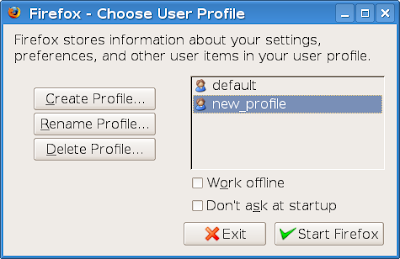
Select new_profile (or whatever the name of your profile is) and click on Start Firefox:
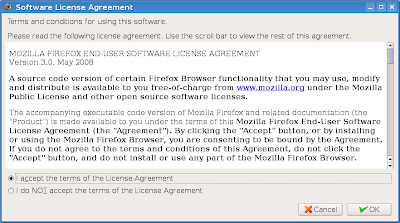
You will be prompted to accept the EULA, then Firefox 3.1 Beta 1 will start and you will be able to test it.
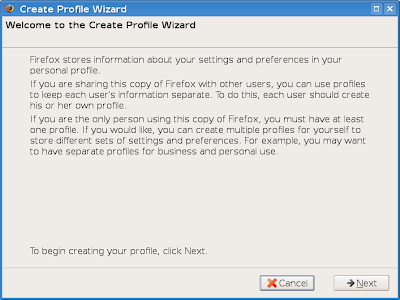
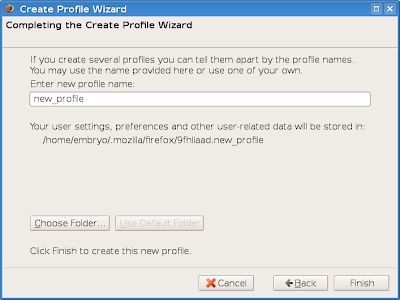
A small window should appear prompting you to choose the profile to use. Click on the Create Profile... button, then follow the instructions as in the screenshots below. You will notice you won't even have to close Iceweasel 3.0.3 if you have it running.
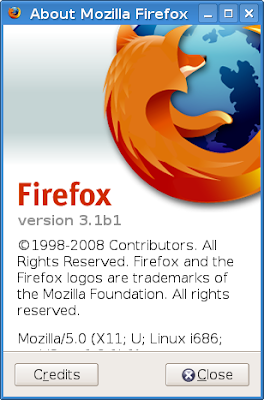
Currently there are no available themes for Firefox 3.1, so you'll have to use the default until they are updated.
Debian Lenny comes with Iceweasel 3.0.3, which is actually Firefox with a changed name and a few minor changes. If you have Iceweasel 3.0.3 installed but want to test this new beta without changing anything to your system, just follow the steps below.
Download Firefox 3.1 Beta 1
Get the Firefox .tar.bz2 archive from here, then uncompress it using:
tar -xjf firefox-3.1b1.tar.bz2
Next, move the firefox directory wherever you want it, for example in your home directory, or in ~/apps etc.
Run it using a new profile
Firefox uses the default profile whenever you run it without specifying another profile using a parameter. To run it using a different profile than the default one, use this command after making sure your current working directory is firefox:
./firefox --no-remote -P new_profile
As you can see, we used the name new_profile for our profile. The --no-remote parameter will not connect Firefox to a running instance, so you will be able to run both your current version and 3.1 Beta 1.


Select new_profile (or whatever the name of your profile is) and click on Start Firefox:

You will be prompted to accept the EULA, then Firefox 3.1 Beta 1 will start and you will be able to test it.

A small window should appear prompting you to choose the profile to use. Click on the Create Profile... button, then follow the instructions as in the screenshots below. You will notice you won't even have to close Iceweasel 3.0.3 if you have it running.

Currently there are no available themes for Firefox 3.1, so you'll have to use the default until they are updated.
October 25, 2008
Wine 1.1.7 Review - First Steps of Direct3D 10 Implementation
I think Wine is one of the most promising and useful applications, especially for those who need to run Windows programs in a Linux environment. A new development release is put up every two weeks or so, and improvements are visible from each version to another.
Wine is the project which makes possible to run games like World of WarCraft, Counter-Strike, Half-Life 2, WarCraft III and so on. And Wine is also the project which makes possible for web developers to test how their web page is viewed under Internet Explorer. Not to mention hundreds of other applications which work very well or well enough with it.
Ever since the first release tagged as 'stable' was put out for the public after 15 years of development, the Wine project continued development and now the latest version is 1.1.7, which brings numerous improvements and additions.
According to the official announcement, one of the highlights for this release is that the first steps were taken to implement the Direct3D technology, which is part of the DirectX API from Microsoft. The open and widespread competitor for Direct3D is OpenGL, the Open Graphics Library.
It's well-known that Wine works awesome with games like WoW, Counter-Strike or Half-Life 2.
A while ago I ran and installed the new Google Chrome web browser through Wine, since a Linux port is not available yet, and the result was very satisfying: with the exception of a little interface slowness, it behaved very well.

For this release, I installed Google Chrome following the tutorial I wrote for 1.1.6. I had to run it as:
wine ~/.wine/drive_c/windows/profiles/USERNAME/Local\ Settings/Application\ Data/Google/Chrome/Application/chrome.exe --new-http --in-process-plugins
And replaced USERNAME with my username. Chrome displayed all the web pages I tried, including this blog, Digg.com, YouTube.com (with the Flash plugin too) and the WineHQ homepage, but scrolling a page is extremely slow and choppy until the web page is completely loaded. I never tested Google Chrome on Windows so I can't compare exactly the behaviour.

I also installed Adobe Flash Player using the browser instead of winetricks. Below are some screenshots running Chrome through Wine. As you can see, Flash is enabled:


Wine provides an application database on their homepage, which classifies applications depending on how well they run and perform: platinum, gold, silver. The nice thing is that each application has detailed information on how to set it up in order to work best, in what conditions it was tested and it also includes user comments. Usually, if a game or application is known to work through Wine but you couldn't set it up, have a look at the comments posted and a solution will surely be provided.
As I already mentioned, one of the most popular games which worked perfectly for me in Wine is World of WarCraft:

I was glad to see the mIRC scripts editor does not crash the application anymore, but instead I couldn't make it connect to another network but the default QuakeNet, so you will have to use the /server command. Otherwise, mIRC 6.35 works pretty well, and if you really really need it and can't re-write your scripts for a native Linux client you can use it through Wine. Still, I suggest using a native IRC client like XChat, Konversation or Irssi.

I also tried the last version of Winamp, 5.541, and I installed the Lite version. It works very well, although I did not test it for long. It plays music.

It's true, I don't think Linux needs to run a player like Winamp, when we have powerful and full-featured, native and open-source audio players like Amarok, Banshee, Rhythmbox, Songbird or XMMS. But maybe someone still finds a use for it, or it can help those who just switched from Windows and can't get used to another player.

Also, here is a top 25 applications/games which run in Wine, by votes.
Overall, the Wine project does what it has always done, bringing Windows games and applications to Linux. It's great to see games like WoW, HL2, CoD4, StarCraft, WarCraft III running very well.
Wine is the project which makes possible to run games like World of WarCraft, Counter-Strike, Half-Life 2, WarCraft III and so on. And Wine is also the project which makes possible for web developers to test how their web page is viewed under Internet Explorer. Not to mention hundreds of other applications which work very well or well enough with it.
Ever since the first release tagged as 'stable' was put out for the public after 15 years of development, the Wine project continued development and now the latest version is 1.1.7, which brings numerous improvements and additions.
According to the official announcement, one of the highlights for this release is that the first steps were taken to implement the Direct3D technology, which is part of the DirectX API from Microsoft. The open and widespread competitor for Direct3D is OpenGL, the Open Graphics Library.
It's well-known that Wine works awesome with games like WoW, Counter-Strike or Half-Life 2.
A while ago I ran and installed the new Google Chrome web browser through Wine, since a Linux port is not available yet, and the result was very satisfying: with the exception of a little interface slowness, it behaved very well.

For this release, I installed Google Chrome following the tutorial I wrote for 1.1.6. I had to run it as:
wine ~/.wine/drive_c/windows/profiles/USERNAME/Local\ Settings/Application\ Data/Google/Chrome/Application/chrome.exe --new-http --in-process-plugins
And replaced USERNAME with my username. Chrome displayed all the web pages I tried, including this blog, Digg.com, YouTube.com (with the Flash plugin too) and the WineHQ homepage, but scrolling a page is extremely slow and choppy until the web page is completely loaded. I never tested Google Chrome on Windows so I can't compare exactly the behaviour.

I also installed Adobe Flash Player using the browser instead of winetricks. Below are some screenshots running Chrome through Wine. As you can see, Flash is enabled:


Wine provides an application database on their homepage, which classifies applications depending on how well they run and perform: platinum, gold, silver. The nice thing is that each application has detailed information on how to set it up in order to work best, in what conditions it was tested and it also includes user comments. Usually, if a game or application is known to work through Wine but you couldn't set it up, have a look at the comments posted and a solution will surely be provided.
As I already mentioned, one of the most popular games which worked perfectly for me in Wine is World of WarCraft:
World of WarCraft

I was glad to see the mIRC scripts editor does not crash the application anymore, but instead I couldn't make it connect to another network but the default QuakeNet, so you will have to use the /server command. Otherwise, mIRC 6.35 works pretty well, and if you really really need it and can't re-write your scripts for a native Linux client you can use it through Wine. Still, I suggest using a native IRC client like XChat, Konversation or Irssi.

I also tried the last version of Winamp, 5.541, and I installed the Lite version. It works very well, although I did not test it for long. It plays music.

It's true, I don't think Linux needs to run a player like Winamp, when we have powerful and full-featured, native and open-source audio players like Amarok, Banshee, Rhythmbox, Songbird or XMMS. But maybe someone still finds a use for it, or it can help those who just switched from Windows and can't get used to another player.

Also, here is a top 25 applications/games which run in Wine, by votes.
Overall, the Wine project does what it has always done, bringing Windows games and applications to Linux. It's great to see games like WoW, HL2, CoD4, StarCraft, WarCraft III running very well.
October 12, 2008
Sometimes It Won't Work
A few annoyances, and I really hope this will be fun. I wrote it last night. Some things which don't work as they are supposed to, or some things which may be annoying - Linux forever, I love it, but sometimes it's not so funny fun as it should be.
Things which you mustn't do
- don't open 3 tabs in firefox in less than 5 seconds
- don't install linux on a system with one sata and one ide drive (adding a hard disk will confuse it even more)
- don't try to install linux on a computer without an internet connection - don't believe me? try installing sarge on a pc without internet, after selecting don't configure network at this time
- movie subtitles must be green, pink, red or yellow, no matter if it's a DVD or a SRT/SUB subtitle
- don't run a task which would take 30 minutes then leave. an error will occure
(if an error doesn't occure, a warning will be issued)
(if the error doesn't occure, are you sure you didn't do something wrong?)
- no, they don't have games on linux
- ...and quake too
- complain if it's closed-source, don't use it if they changed the license to GPL
- a font size of 7 looks normal, but 8 is bold and big. for 6 you will need KMag.
-
open-source projects, use Flash for the homepage; also make sure Firefox uses 100% CPU when browsing your homepages
- ask questions twice, notify a user of some update and newly installed script twice
Particular Private License #0:
I don't want to show you my code!
Particular Private License #1:
It's mine!
Particular Private License #2:
I really hate my neighbour :-)
Particular Private License #3:
Where is my money?
- don't complain, for you did something wrong like not editing some config file of an app which had a bug filed since 2005 and which can't be fixed unless somebody rewrites a whole library which was licensed under a proprietary license and now is free but still wait for a new version to appear and when it's out test it for two more years and you'll find the bug fixed but guess what? the feature is not there anymore
CLI applications are as follows:
- the ones from GNU, which are standard
- the ones from other projects, some of which are great
- the ones which give an error when ran as 'app --version' or 'app --help'
(they all are included in heavy distros)
Who or what is evil?
- Microsoft is evil
- Apple is evil
- Since Canonical offers Linux support for money, I'm sure they are evil too
- Mono, Java too
Bug fixing squad:
If you decide to fix bugs, first put them there so you know what to fix
Choose carefully the bugs you will fix, for some of them you won't know the fix
Start a new distribution, the rules:
- use packages from an older distribution
- do not ever fix bugs
- choose a desktop environment, then start 3 more distros using other desktop environments
- add great features to applications, which will act as follows:
1. use an infinite loop no matter if the user clicks yes/no
2. make it impossible to close the application
3. teach the user how to use ps
- high hopes: 10 goals in a short time, come up with 1 which is terribly done anyway
- yeah, a new wallpaper and an iso image makes a new distro - burn fire burn, evil inside etc
- handle with care - that is: don't start an application unless you know it previously worked before
- an error means you did it wrong
(no, it's not a bug, you just have to configure it 2 hours in order to make it work)
Things which you mustn't do
- don't open 3 tabs in firefox in less than 5 seconds
- don't install linux on a system with one sata and one ide drive (adding a hard disk will confuse it even more)
- don't try to install linux on a computer without an internet connection - don't believe me? try installing sarge on a pc without internet, after selecting don't configure network at this time
- movie subtitles must be green, pink, red or yellow, no matter if it's a DVD or a SRT/SUB subtitle
- don't run a task which would take 30 minutes then leave. an error will occure
(if an error doesn't occure, a warning will be issued)
(if the error doesn't occure, are you sure you didn't do something wrong?)
- no, they don't have games on linux
- ...and quake too
- complain if it's closed-source, don't use it if they changed the license to GPL
- a font size of 7 looks normal, but 8 is bold and big. for 6 you will need KMag.
-
open-source projects, use Flash for the homepage; also make sure Firefox uses 100% CPU when browsing your homepages
- ask questions twice, notify a user of some update and newly installed script twice
Particular Private License #0:
I don't want to show you my code!
Particular Private License #1:
It's mine!
Particular Private License #2:
I really hate my neighbour :-)
Particular Private License #3:
Where is my money?
- don't complain, for you did something wrong like not editing some config file of an app which had a bug filed since 2005 and which can't be fixed unless somebody rewrites a whole library which was licensed under a proprietary license and now is free but still wait for a new version to appear and when it's out test it for two more years and you'll find the bug fixed but guess what? the feature is not there anymore
CLI applications are as follows:
- the ones from GNU, which are standard
- the ones from other projects, some of which are great
- the ones which give an error when ran as 'app --version' or 'app --help'
(they all are included in heavy distros)
Who or what is evil?
- Microsoft is evil
- Apple is evil
- Since Canonical offers Linux support for money, I'm sure they are evil too
- Mono, Java too
Bug fixing squad:
If you decide to fix bugs, first put them there so you know what to fix
Choose carefully the bugs you will fix, for some of them you won't know the fix
Start a new distribution, the rules:
- use packages from an older distribution
- do not ever fix bugs
- choose a desktop environment, then start 3 more distros using other desktop environments
- add great features to applications, which will act as follows:
1. use an infinite loop no matter if the user clicks yes/no
2. make it impossible to close the application
3. teach the user how to use ps
- high hopes: 10 goals in a short time, come up with 1 which is terribly done anyway
- yeah, a new wallpaper and an iso image makes a new distro - burn fire burn, evil inside etc
- handle with care - that is: don't start an application unless you know it previously worked before
- an error means you did it wrong
(no, it's not a bug, you just have to configure it 2 hours in order to make it work)
September 12, 2008
How-To: Compile and Install xine-lib 1.1.15 in Debian Lenny and Ubuntu 8.04
Xine is an engine which allows to play audio CDs, DVDs, VCDs, various audio and video formats like AVI, WMV, MOV to list a few. The last version of xine-lib is 1.1.15, released on August 14, 2008.
Installation in Debian Lenny
To compile from source and install xine-lib 1.1.15 in Debian Lenny you'll have to follow the steps below.
1. Enable the sources repositories
Make sure you have a line like the following in your /etc/apt/sources.list file:
deb-src http://ftp.ro.debian.org/debian/ lenny main contrib non-free
Then update the packages list as root:
apt-get update
2. Install the dependencies
As root, type:
apt-get build-dep libxine1
This will install the development packages and the tools needed to compile Xine.
3. Download the source, compile and install
Download the last xine-lib version from here, uncompress it and compile as usual:
./configure
make
make install
Last one as root.
xine-lib should be now installed in /usr/local/lib/.
Installation in Ubuntu 8.04
Ubuntu Hardy comes with libxine 1.1.11, so if you want to update to the latest version, you need to follow the steps above, with the exception of preceding the commands which need root privileges with sudo. For example:
sudo apt-get build-dep libxine1
./configure
make
sudo make install
With your user's password.
Video players using Xine
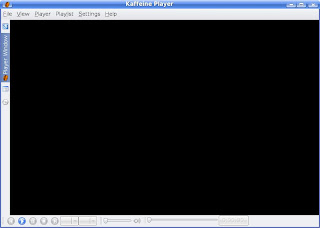
I can recommend Kaffeine and Xine-UI, both these players use the Xine engine.
Updated: Sep 12, 2008
Installation in Debian Lenny
To compile from source and install xine-lib 1.1.15 in Debian Lenny you'll have to follow the steps below.
1. Enable the sources repositories
Make sure you have a line like the following in your /etc/apt/sources.list file:
deb-src http://ftp.ro.debian.org/debian/ lenny main contrib non-free
Then update the packages list as root:
apt-get update
2. Install the dependencies
As root, type:
apt-get build-dep libxine1
This will install the development packages and the tools needed to compile Xine.
3. Download the source, compile and install
Download the last xine-lib version from here, uncompress it and compile as usual:
./configure
make
make install
Last one as root.
xine-lib should be now installed in /usr/local/lib/.
Installation in Ubuntu 8.04
Ubuntu Hardy comes with libxine 1.1.11, so if you want to update to the latest version, you need to follow the steps above, with the exception of preceding the commands which need root privileges with sudo. For example:
sudo apt-get build-dep libxine1
./configure
make
sudo make install
With your user's password.
Video players using Xine
I can recommend Kaffeine and Xine-UI, both these players use the Xine engine.
Kaffeine 0.8.6

Updated: Sep 12, 2008
September 10, 2008
How-To: Install Video Codecs and DVD Support in Ubuntu/Kubuntu 8.04 'Hardy Heron'
Medibuntu is a project somewhat similar with debian-multimedia.org for Debian, providing packages which are not included in the official Ubuntu repositories due to legal issues. In order to make use of the packages included in Medibuntu (including the non-free video codecs w32codecs and libdvdcss2 for watching ecrypted DVDs), you will only need to follow several easy steps explained below.
1. Add the Medibuntu repository address to /etc/apt/sources.list
Edit as root the /etc/apt/sources.list file (e.g. sudo nano /etc/apt/sources.list or kdesu kate /etc/apt/sources.list) and add the following two lines:
deb http://packages.medibuntu.org/ hardy free non-free
deb-src http://packages.medibuntu.org/ hardy free non-free
2. Update the packages list
Issue the following command:
sudo apt-get update
3. Install the w32codecs and libdvdcss2 packages
To install those two packages, just type in the command:
sudo apt-get install w32codecs libdvdcss2
It should be done now. The codecs will be installed in /usr/lib/codecs/ and the DVD library in /usr/lib/libdvdcss2.so.2.0.8.
Another way to install libdvdcss2 is to first install the package libdvdread3:
sudo apt-get install libdvdread3
And then running the command:
sudo /usr/share/doc/libdvdread3/install-css.sh
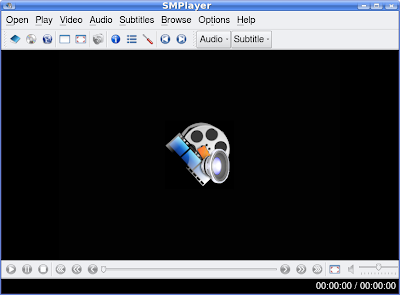
As video players, I recommend SMPlayer and Kaffeine, the first using the MPlayer engine, while the latter uses the Xine engine. They both have subtitle support and many powerful features (like remembering video position and settings after closing the application in SMPlayer), and Kaffeine also reads DVD menus.
To install either of those, use one of the commands below:
sudo apt-get install smplayer
sudo apt-get install kaffeine
Updated: Sep 10, 2008 (Created: Sep 10, 2008)
1. Add the Medibuntu repository address to /etc/apt/sources.list
Edit as root the /etc/apt/sources.list file (e.g. sudo nano /etc/apt/sources.list or kdesu kate /etc/apt/sources.list) and add the following two lines:
deb http://packages.medibuntu.org/ hardy free non-free
deb-src http://packages.medibuntu.org/ hardy free non-free
2. Update the packages list
Issue the following command:
sudo apt-get update
3. Install the w32codecs and libdvdcss2 packages
To install those two packages, just type in the command:
sudo apt-get install w32codecs libdvdcss2
It should be done now. The codecs will be installed in /usr/lib/codecs/ and the DVD library in /usr/lib/libdvdcss2.so.2.0.8.
Another way to install libdvdcss2 is to first install the package libdvdread3:
sudo apt-get install libdvdread3
And then running the command:
sudo /usr/share/doc/libdvdread3/install-css.sh
As video players, I recommend SMPlayer and Kaffeine, the first using the MPlayer engine, while the latter uses the Xine engine. They both have subtitle support and many powerful features (like remembering video position and settings after closing the application in SMPlayer), and Kaffeine also reads DVD menus.
SMPlayer 0.6.0 running in Kubuntu 8.04

To install either of those, use one of the commands below:
sudo apt-get install smplayer
sudo apt-get install kaffeine
Updated: Sep 10, 2008 (Created: Sep 10, 2008)
August 31, 2008
How-To: Make UT2004 Use OSS on Debian Lenny
Some of us playing Unreal Tournament 2004 may be familiar with the error open /dev/[sound/]dsp: Resource temporarily unavailable. This is usually caused because the sound system is busy (for example, you have an audio player opened, or a paused movie).
The simplest way to get over this problem is to install the alsa-oss package, which contains the aoss wrapper to allow the use of ALSA OSS library. In Debian, type as root:
apt-get install alsa-oss
Then run UT2004 like this:
aoss ut2004
Or:
aoss /usr/local/games/ut2004demo/ut2004-demo
Depending on where your game is installed. The good thing about this is that you can now listen to music in a player separate from the one included in the game and also hear the UT2004 sounds.
The simplest way to get over this problem is to install the alsa-oss package, which contains the aoss wrapper to allow the use of ALSA OSS library. In Debian, type as root:
apt-get install alsa-oss
Then run UT2004 like this:
aoss ut2004
Or:
aoss /usr/local/games/ut2004demo/ut2004-demo
Depending on where your game is installed. The good thing about this is that you can now listen to music in a player separate from the one included in the game and also hear the UT2004 sounds.
August 12, 2008
Banshee 1.2 - 1.x Series Getting to Maturity
The new Banshee 1.2 includes several new features over the last stable release, like the equaliser or the music recommendations panel. The full list of new or improved features is here. For those who didn't hear about Banshee yet, it's a pretty powerful audio player for GNOME which received more and more attention lately, featuring things like a media library, support for Last.fm, podcasts, cover fetching, plugins and many more.

I was enchanted to try the so-called 'Amarok Migration' feature, which, according to the official website, lets you import ratings, play counts and podcasts from Amarok. Well, I have Amarok 1.4.9.1 using SQLite but Banshee crashed when I tried to import those using the Media -> Import Media dialogue, already having a media library in Banshee. I tried deleting the file ~/.config/banshee-1/banshee.db and this time the import feature worked flawlessly, and Banshee didn't crash anymore.

The equaliser works very well, except that there are no default presets. I think several default presets like 'Rock', or 'Full Bass' would be nice instead of letting the user setting those.

I was still disappointed to see that the cover fetching plugin doesn't look inside the song's directory for local files like cover.jpg or front.png, but the retrieval of covers from the Internet works pretty well. All of the covers for albums which don't have additions like [2004 Remaster] or [Limited Edition] were correctly fetched.

Banshee looks more improved with every version and it's definitely a very promising player. Compared to 1.0.0, this new release it's much more stable (no more crashes when clicking on the Last.fm tab for example), but I think it still needs some work at cover fetching, and the Last.fm integration won't show all the images for recently played tracks. Last.fm changed the layout recently so I'm not sure whether this is Banshee's fault at all.

Although the 1.0 release was also accompanied by a new, professionally designed website, work at the Wiki seems to be still in progress.
Although I'm not a GNOME or GTK fan, I can warmly recommend Banshee to any audiophile using this desktop environment. It's almost full-featured, and stable enough now, the 1.x series showing real signs of maturity now.

Banshee 1.2.0 playing

I was enchanted to try the so-called 'Amarok Migration' feature, which, according to the official website, lets you import ratings, play counts and podcasts from Amarok. Well, I have Amarok 1.4.9.1 using SQLite but Banshee crashed when I tried to import those using the Media -> Import Media dialogue, already having a media library in Banshee. I tried deleting the file ~/.config/banshee-1/banshee.db and this time the import feature worked flawlessly, and Banshee didn't crash anymore.
Importing the Amarok media library

The equaliser works very well, except that there are no default presets. I think several default presets like 'Rock', or 'Full Bass' would be nice instead of letting the user setting those.
The new equaliser

I was still disappointed to see that the cover fetching plugin doesn't look inside the song's directory for local files like cover.jpg or front.png, but the retrieval of covers from the Internet works pretty well. All of the covers for albums which don't have additions like [2004 Remaster] or [Limited Edition] were correctly fetched.
Plugins

Banshee looks more improved with every version and it's definitely a very promising player. Compared to 1.0.0, this new release it's much more stable (no more crashes when clicking on the Last.fm tab for example), but I think it still needs some work at cover fetching, and the Last.fm integration won't show all the images for recently played tracks. Last.fm changed the layout recently so I'm not sure whether this is Banshee's fault at all.
Last.fm integration - Banshee features song submission too

Although the 1.0 release was also accompanied by a new, professionally designed website, work at the Wiki seems to be still in progress.
Although I'm not a GNOME or GTK fan, I can warmly recommend Banshee to any audiophile using this desktop environment. It's almost full-featured, and stable enough now, the 1.x series showing real signs of maturity now.
About

August 10, 2008
How-To: Compile and Install Banshee 1.2.0 on Debian Lenny
Banshee is a powerful audio player written using GTK, featuring audio and video libraries, support for podcasts and much more. The last version, 1.2, was released on July 30, 2008.
1. Install the necessary dependencies
As root, type:
apt-get install build-essential
apt-get build-dep banshee
For the last one, make sure you have sources repositories enabled in your /etc/apt/sources.list file (there is a line which starts with deb-src).
2. Download the source tarball
Download the source tarball from here, under the Source releases, then change the current working directory to where you saved the archive, and uncompress it:
tar -xjf banshee-1-1.2.0.tar.bz2
Change the working directory to banshee-1-1.2.0, and proceed to the next step.
3. Compile Banshee 1.2.0
In the banshee-1-1.2.0 directory, issue the usual:
./configure
make
make install
The last command as root. Banshee 1.2 should be now properly installed. Run it as banshee-1 from command line or pressing ALT+F2 and typing the name in the run dialogue that appears.

1. Install the necessary dependencies
As root, type:
apt-get install build-essential
apt-get build-dep banshee
For the last one, make sure you have sources repositories enabled in your /etc/apt/sources.list file (there is a line which starts with deb-src).
2. Download the source tarball
Download the source tarball from here, under the Source releases, then change the current working directory to where you saved the archive, and uncompress it:
tar -xjf banshee-1-1.2.0.tar.bz2
Change the working directory to banshee-1-1.2.0, and proceed to the next step.
3. Compile Banshee 1.2.0
In the banshee-1-1.2.0 directory, issue the usual:
./configure
make
make install
The last command as root. Banshee 1.2 should be now properly installed. Run it as banshee-1 from command line or pressing ALT+F2 and typing the name in the run dialogue that appears.
Running Banshee 1.2.0

Most Popular Posts - July
SMPlayer Review - One of the Most Powerful Video Players for Linux
SMPlayer is a complete video player built in Qt 4.4.0 and based on the powerful, open-source MPlayer.

XChat 2.8.6 Review - A Great Graphical IRC Client
XChat is a very powerful IRC client written in GTK who has been around for years and is now feature complete, low on resources, with a powerful scripting interface and support for C plugins.

Why Is It So Hard for Windows Users to Understand That Linux Is Not Windows
A short essay on what makes Windows users who try to switch to Linux have the impression that Linux is harder to learn or use than Windows.
5 Reasons to Use CLI over GUI
First, I must say that using CLI is not always faster, not necessarily. There are tasks which can be done faster and easier using some GUI application rather than typing a whole bunch of commands. But, nevertheless, command line is still very powerful and it's more appropriate to use it for certain tasks.
4 Ways to Rip DVDs on Linux
Review of 4 graphical applications to rip DVDs on Linux: K9Copy, AcidRip, DVD::Rip and Thoggen.

10 Best KDE Applications - Reloaded
Review of 10 KDE applications, a continuation to the 10 Best KDE Applications article I wrote a while ago.

Xfe Review - Wonderful File Manager
Review of the Xfe file manager for Linux written using the FOX toolkit.

12 Web Browsers for Linux - Review
A review on 12 graphical and CLI web browsers for Linux, including Firefox, Konqueror, Kazehakase, lynx and several more.

SMPlayer is a complete video player built in Qt 4.4.0 and based on the powerful, open-source MPlayer.

XChat 2.8.6 Review - A Great Graphical IRC Client
XChat is a very powerful IRC client written in GTK who has been around for years and is now feature complete, low on resources, with a powerful scripting interface and support for C plugins.

Why Is It So Hard for Windows Users to Understand That Linux Is Not Windows
A short essay on what makes Windows users who try to switch to Linux have the impression that Linux is harder to learn or use than Windows.
5 Reasons to Use CLI over GUI
First, I must say that using CLI is not always faster, not necessarily. There are tasks which can be done faster and easier using some GUI application rather than typing a whole bunch of commands. But, nevertheless, command line is still very powerful and it's more appropriate to use it for certain tasks.
4 Ways to Rip DVDs on Linux
Review of 4 graphical applications to rip DVDs on Linux: K9Copy, AcidRip, DVD::Rip and Thoggen.

10 Best KDE Applications - Reloaded
Review of 10 KDE applications, a continuation to the 10 Best KDE Applications article I wrote a while ago.

Xfe Review - Wonderful File Manager
Review of the Xfe file manager for Linux written using the FOX toolkit.

12 Web Browsers for Linux - Review
A review on 12 graphical and CLI web browsers for Linux, including Firefox, Konqueror, Kazehakase, lynx and several more.

July 27, 2008
IRC Clients for Linux - A Review
Since I'm an IRC addict and I always liked to spend time learning new stuff on IRC, here is a review of several IRC clients for Linux. Some of them are well-known and popular, like XChat, Konversation or Irssi, and others are not so widely used or known, but nevertheless, they deserve mentioning.
KVirc
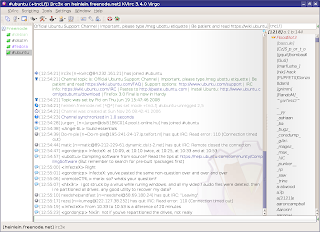
KVirc is a powerful client for KDE focusing on an apealing interface, providing its own scripting language called KVS (KVirc scripting language), with lots of options for configurating it, and much more. Among all the clients I tested, KVirc was the most bloated, trying always to include as many options as possible and be user-friendly in the same time, but sometimes it felt like not all of those were needed. For example, the Ignore As... menu includes all the possible combinations for ignoring a person. I think it would have been wiser to include only 2 or 3 and eventually provide a dialog window so the user can enter it manually, with a brief explanation for how it works.
I also found the CTCP option not useful when on a channel, since if you CTCP VERSION or PING, all the users on that channel will get the CTCP request. On a large channel that can lead to a ban, or lag, and it's just not useful.
Anyway, back to the good stuff that KVirc provides. Each release has a nice codename, like the one in the last version, 'Virgo', with a suggestive picture to emphasise it.
Although I didn't test the scripting language much, it looks pretty much the same as the one mIRC has, so for those who are switching from Windows, KVirc should be a good choice. KVS is accompanied by complete documentation which can be accessed from the Help -> Help Browser menus (you can open it in two different ways, as a separate tab or as a panel). It also supports themes, addons, or the possibility to save different configuration profiles.
 KVirc scripting menu - the system is somewhat similar with the one of mIRC
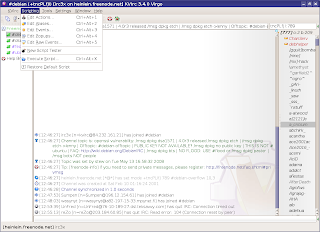
Overall, although this particular version (3.4.0) was a little slow for me, KVirc is complete, powerful and it looks very good.
Official website

XChat
XChat is a very popular graphical client for Linux, including powerful scripting support in Perl, Python, Tcl, C plugins, powerful configurability using /SET variables and many other. XChat is built in GTK, and a version using GNOME libraries, called xchat-gnome, is also available.
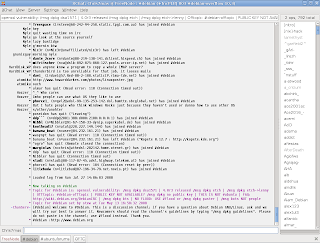
Some of the features I love about XChat besides the powerful scripting support: logging system allowing to name your path and files using date specifiers (like %b for month or %d for day and so on), the interface is simple and clean, yet all the options I need are available using /SET, including the conference mode. The Linux version doesn't receive as much attention like the Windows one (probably because the Windows one is paid), but XChat is already complete.
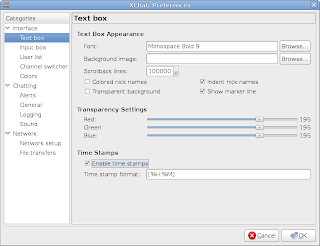
Online documentation is very abundant, and tutorials on how to write scripts and plugins are very helpful and useful.
Official website

Irssi
Irssi is a command line client which includes a simple yet very effective way of navigating through channels/queries. You'll have to read the manual if you use it for the first time, but once you get used to shortcuts (most of them being Emacs-like), Irssi gets pretty easy to use, and shortcuts can be customised too. It supports Perl scripting and the official website contains hundreds of them, can be customised in each and every way using commands explained in detail in the documentation. For me, Irssi wins at all the chapters if it is to compare it with Weechat, Epic4 or TinyIRC.
Official website

Konversation
I noticed Konversation received more and more attention over the last years, since it's a client aimed towards persons new to IRC, and strives to be user-friendly. And it succeeds, having all the necessary options in the configuration window. As default though, the interface lacks a toolbar menu, which can be enabled using the Settings -> Show Toolbar menu, and shortcut icons can be added there. As every decent KDE application, Konversation allows editing shortcuts, it can be embedded in the system tray, it includes configurable notifications, it has a basic logging system and an option to load logs in a new tab and perform searches. When joining a new channel or opening a new query, a backlog will be displayed with the last lines of the previous discussion (if any).
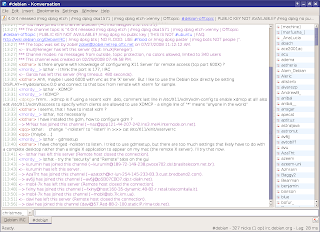
Konversation only lacks event-based scripting, and that's a must-have for a scripting language in my opinion. Otherwise, it comes as default with several powerful scripts, like the now playing script (supporting the major audio and video players for KDE), or a weather script, or system info. The first release candidate for version 1.1 is now available.
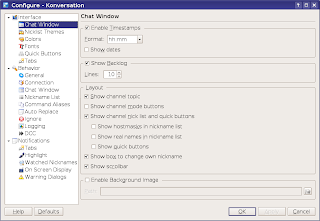
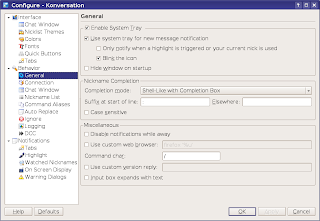
I warmly recommend Konversation to users who want to try IRC for the first time, but XChat or KVirc would be good choices too.
Official website

Pidgin
I must say, I rarely use Pidgin or Kopete for connecting to an IRC network, but you can find it useful if you don't care much about having a powerful, dedicated client especially for IRC. Pidgin is widely known for being the GNOME IM (Instant Messaging) client first, but it can also be used as a basic IRC client if you are looking to only get on IRC, without all the options advanced clients provide.
Official website
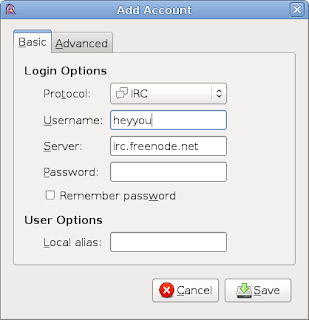

Kopete
Just like Pidgin, Kopete is the KDE IM client and provides a basic IRC client too. The advantage both Pidgin and Kopete provide is that if you use IM a lot (for example you have both Yahoo and MSN accounts) and want to get on IRC, you can use a single application for it, without the need of opening a new application just to chat on IRC.
Official website
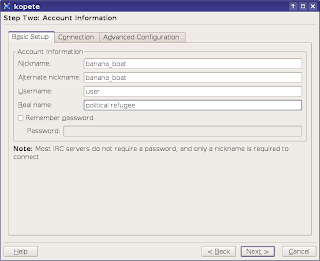

As mentioned above, there are many more clients available, like the popular BitchX, the lightweight Weechat, the classic Epic4 or TinyIRC (official website?) to give a few.
KVirc
KVirc is a powerful client for KDE focusing on an apealing interface, providing its own scripting language called KVS (KVirc scripting language), with lots of options for configurating it, and much more. Among all the clients I tested, KVirc was the most bloated, trying always to include as many options as possible and be user-friendly in the same time, but sometimes it felt like not all of those were needed. For example, the Ignore As... menu includes all the possible combinations for ignoring a person. I think it would have been wiser to include only 2 or 3 and eventually provide a dialog window so the user can enter it manually, with a brief explanation for how it works.
KVirc 3.4.0 'Virgo'

I also found the CTCP option not useful when on a channel, since if you CTCP VERSION or PING, all the users on that channel will get the CTCP request. On a large channel that can lead to a ban, or lag, and it's just not useful.
Anyway, back to the good stuff that KVirc provides. Each release has a nice codename, like the one in the last version, 'Virgo', with a suggestive picture to emphasise it.
Although I didn't test the scripting language much, it looks pretty much the same as the one mIRC has, so for those who are switching from Windows, KVirc should be a good choice. KVS is accompanied by complete documentation which can be accessed from the Help -> Help Browser menus (you can open it in two different ways, as a separate tab or as a panel). It also supports themes, addons, or the possibility to save different configuration profiles.
KVirc help browser
 KVirc scripting menu - the system is somewhat similar with the one of mIRC
Overall, although this particular version (3.4.0) was a little slow for me, KVirc is complete, powerful and it looks very good.
Official website
Configuring KVirc

XChat
XChat is a very popular graphical client for Linux, including powerful scripting support in Perl, Python, Tcl, C plugins, powerful configurability using /SET variables and many other. XChat is built in GTK, and a version using GNOME libraries, called xchat-gnome, is also available.
XChat usual look

Some of the features I love about XChat besides the powerful scripting support: logging system allowing to name your path and files using date specifiers (like %b for month or %d for day and so on), the interface is simple and clean, yet all the options I need are available using /SET, including the conference mode. The Linux version doesn't receive as much attention like the Windows one (probably because the Windows one is paid), but XChat is already complete.
XChat preferences

Online documentation is very abundant, and tutorials on how to write scripts and plugins are very helpful and useful.
Official website
Default look for xchat-gnome

Irssi
Irssi is a command line client which includes a simple yet very effective way of navigating through channels/queries. You'll have to read the manual if you use it for the first time, but once you get used to shortcuts (most of them being Emacs-like), Irssi gets pretty easy to use, and shortcuts can be customised too. It supports Perl scripting and the official website contains hundreds of them, can be customised in each and every way using commands explained in detail in the documentation. For me, Irssi wins at all the chapters if it is to compare it with Weechat, Epic4 or TinyIRC.
Official website
Irssi running inside Konsole

Konversation
I noticed Konversation received more and more attention over the last years, since it's a client aimed towards persons new to IRC, and strives to be user-friendly. And it succeeds, having all the necessary options in the configuration window. As default though, the interface lacks a toolbar menu, which can be enabled using the Settings -> Show Toolbar menu, and shortcut icons can be added there. As every decent KDE application, Konversation allows editing shortcuts, it can be embedded in the system tray, it includes configurable notifications, it has a basic logging system and an option to load logs in a new tab and perform searches. When joining a new channel or opening a new query, a backlog will be displayed with the last lines of the previous discussion (if any).
Konversation 1.0.1 - 1.1RC1 has been released too

Konversation only lacks event-based scripting, and that's a must-have for a scripting language in my opinion. Otherwise, it comes as default with several powerful scripts, like the now playing script (supporting the major audio and video players for KDE), or a weather script, or system info. The first release candidate for version 1.1 is now available.
Konversation configuration


I warmly recommend Konversation to users who want to try IRC for the first time, but XChat or KVirc would be good choices too.
Official website
Default Konversation scripts

Pidgin
I must say, I rarely use Pidgin or Kopete for connecting to an IRC network, but you can find it useful if you don't care much about having a powerful, dedicated client especially for IRC. Pidgin is widely known for being the GNOME IM (Instant Messaging) client first, but it can also be used as a basic IRC client if you are looking to only get on IRC, without all the options advanced clients provide.
Official website
Adding a new IRC account with Pidgin

Pidgin on IRC

Kopete
Just like Pidgin, Kopete is the KDE IM client and provides a basic IRC client too. The advantage both Pidgin and Kopete provide is that if you use IM a lot (for example you have both Yahoo and MSN accounts) and want to get on IRC, you can use a single application for it, without the need of opening a new application just to chat on IRC.
Official website
Kopete IRC account

#debian @ Freenode on Kopete

As mentioned above, there are many more clients available, like the popular BitchX, the lightweight Weechat, the classic Epic4 or TinyIRC (official website?) to give a few.
Subscribe to:
Posts (Atom)